Day18: Useful videos about automation


There're many videos about automation in Pluralsight website: https://www.pluralsight.com/
some course like:
Automated Web Testing with Selenium
https://www.pluralsight.com/courses/selenium

Automated Web Testing with Selenium and WebDriver Using Java
https://www.pluralsight.com/courses/automated-web-testing-selenium-webdriver-java

Automated Testing: End to End
https://www.pluralsight.com/courses/automated-testing-end-to-end

Day17: Advice for people getting started


For those who want to get started with automation testing, some experience and opinion that I could share are:

1, Once you decide to start automation testing, find some resources to support yourself, such as online videos, training course, other automation testers who can help you.

2, Put effort but take your time. Understand the fundamental knowledge about automation testing by asking the WH questions: What is automation testing? who does it? Why do people do automation testing? When and how is it done? and trying get the answers to those questions.

3, Choose one programming language and related IDE and framework to learn and master it.

4, The more you do, the more you will be interested in it, then you will get known about it more and faster.  Once you're confident about a few aspects of automation, you'll want to know a wider range of it.

Day16: Share the most valuable piece of automation being used by your team


There's a selenium C# automation framework written by our ex-QA lead in the team. It followed the hybrid approach, using data-driven, POM. The structure of this framework is simple but very clear, so it's easy for everyone to use it to develop his/her automation. And is a good example for beginners to understand automation framework and learn how to create their own framework from it.

Day13: Share your favourite automation tool and why?


So far, my favourite automation tool is Selenium WebDriver. I use it to do automation testing for Web applications. I like it because it's powerful due to the following reasons:

1, Selenium WebDriver is an open source tool. Anybody can download and use it at free cost.

2, it can be used with many popular programming languages to write test scripts(It supports C#, Java, Python, PHP, Ruby, etc.), so it's easy to use. I use it with C# and Java.

3, it automates web browsers and supports all popular browsers, such as Chrome, FireFox, Safari, etc. , so it's great to use it to do a web UI testing.

4, it supports cross-browser testing.

5, it supports various Operating Environment to implement tests, such as MS Windows, Linux, Macintosh etc.

6, it supports parallel testing.

7, it supports various test framework like NUnit, XUnit, JUnit, TestNG, etc.

8, it has a good community to share knowledge. Testers can easily get answers to their questions about Selenium from online.

9, it can integrate with some build automation tool like Maven.

There must be some other functionalities in Selenium WebDriver which are waiting for us to explore, so have fun with it:-)   
Day12: Read and share some interesting blogs on automation


There're some interesting and useful blogs which include contents of general software testing, and automation as well. I follow and learn a lot from them.

My ex-QA lead and mentor Kumar's blog: http://qachief.com/

Guru99: https://www.guru99.com/

Software Testing Help:  https://www.softwaretestinghelp.com/

Pragmatists: https://blog.pragmatists.com/

And here's my own blog where I've been recording and sharing my study process and thoughts about software testing.
http://jasminethetester.blogspot.com/


Day11: Compare and contrast Mocking, Stubbing and Faking

Mock,stub and fake are all test doubles which are commonly used in automated unit testing. They look and behave like their product equivalents, but simplified. Using test doubles reduces complexity because it allows verifying code independently from the rest of the system. Sometimes, it's even necessary to execute the self-validating at all.

Although they are all test doubles, they're different implementation variations. 


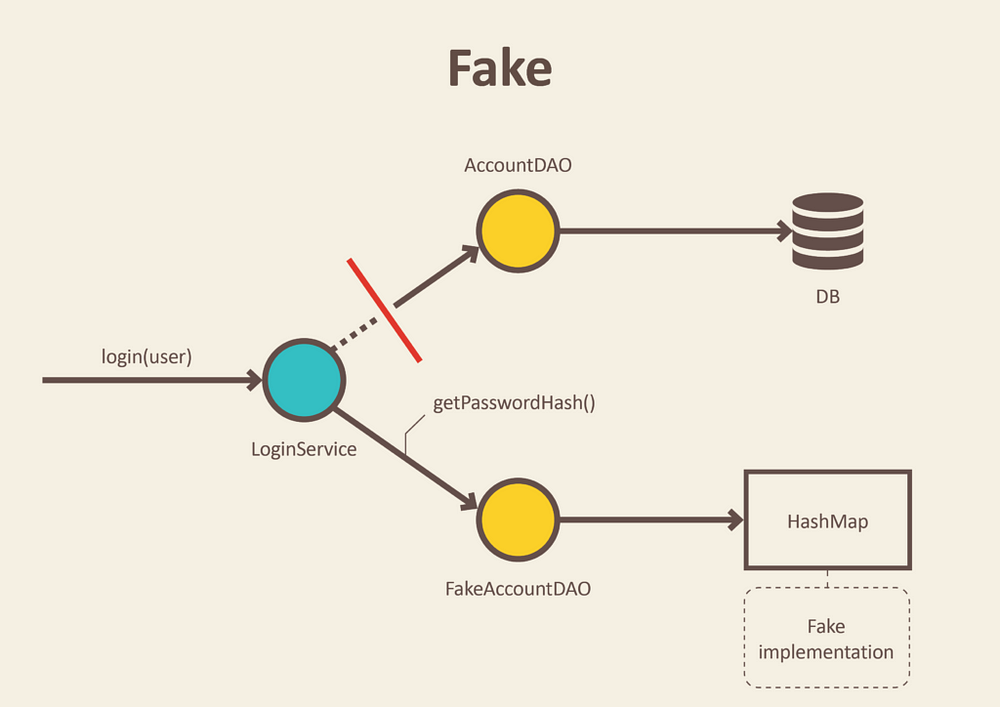
Fakes: They are objects that have working implementations, but not the same as the production ones. Usually, they take some shortcut and have a simplified version of the production code.  

e.g.
The above picture shows a Fake AccountDAO that is an in-memory implementation of Data Access Object and will not engage database but just use a simple collection to store data. This allows testers to do integration test of services without starting up a whole database and performing time-consuming requests.

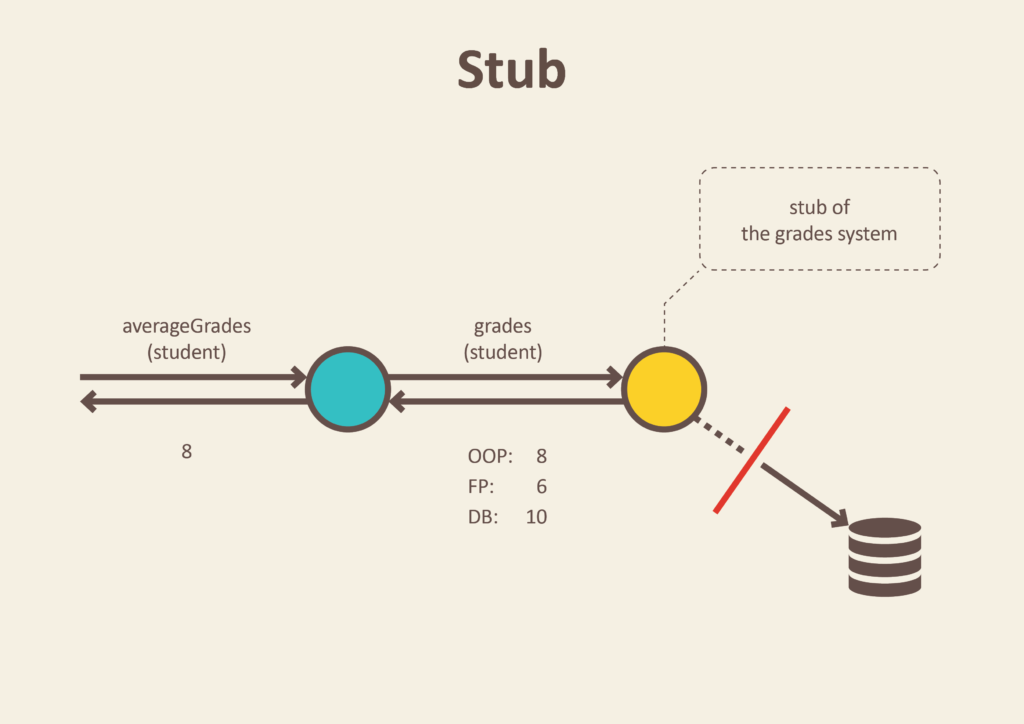
Stubs: They are objects that have predefined data and use it to answer the calls during tests when we can't or don't want to involve the reals objects that should answer the calls with real data.
e.g.
This example shows that a method calls an object to return some data from the real database. Instead of the real object, we introduce a stub within which just enough data has been defined to respond to the call during the test.

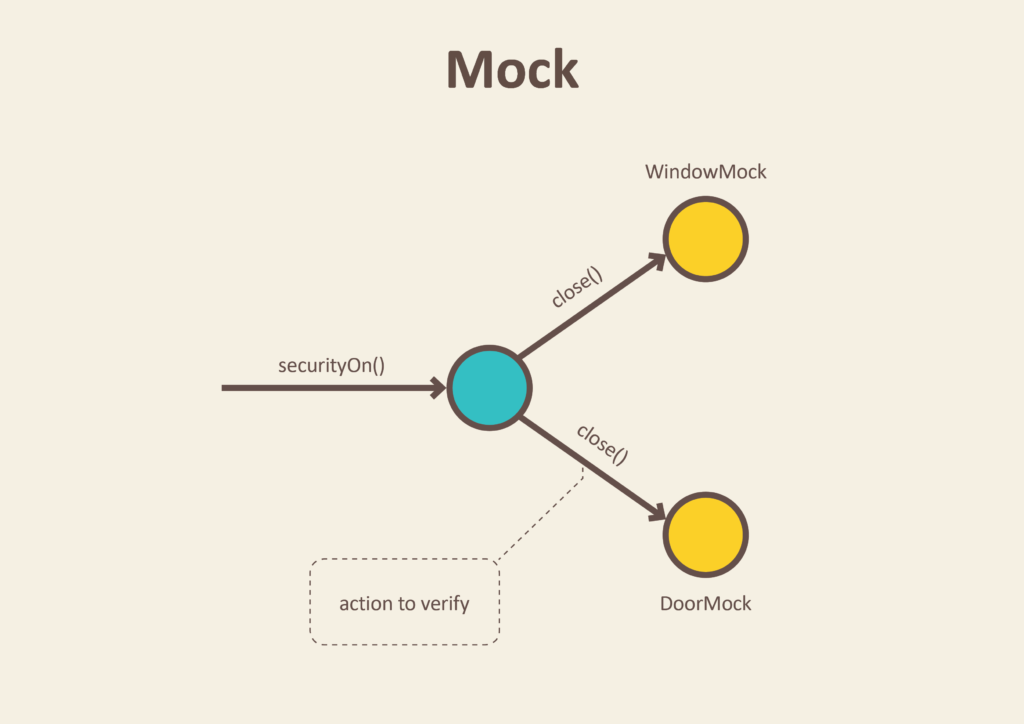
Mock: It's a method/object that simulates the behavior or a real method/object in controlled ways. we use mocks when we don't want to invoke the production code or there's no easy way to verify that the intended code was executed.
e.g.
In the above example, involving the real door and window is not easy or we don't want to do that each time when we test that if the security method is working. So we place door and window mocks in the test.
After execution of the securityOn method, window and door mocks recorded all interactions so that we can verify that window and door objects were instructed to close themselves. That's all we need to test from the SecurityCentral perspective.