Test Planning and Control

Test Planning is the most important phase of Software testing life cycle.
Once the project and product requirements have been done, test planning starts and all the objectives, effort and cost estimates for the entire project would be determined in this phase.

Major tasks in test planning should include:

--Designing test strategy, including:
test scope--Which components or features would be tested(in scope) and which would be not(out of scope).
test type--Set priority of test types for the project based on the context, such as integration test, system test, user acceptance test, etc.
risks & issues--List all potential risks&issues and the corresponding mitigations.
test logistic--Who will test? When will the test occur?

--Defining test objectives
The overall objective of the testing is to find as many software defects as possible and ensure the software is bug free before release.
To define the test objectives, do the following 2 steps:
1. List all features(functionality, performance, GUI, etc.)that may need to be tested.
2. Define the target or goal of the test based on the above features.

--Defining test criteria
Entry criteria set to which test should begin or suspend(e.g. suspend at 40% fail rate of test cases);
Exit criteria set to which test should be a successful completion(e.g. exit at 90% run rate of test cases and 95% pass rate).

--Planning resources
Human resources: test manager/leader/analyst
System resources: server/test tools/network/computers

--Planning test environment
Real business and user environment, physical environment.

--Schedule & estimation
Tasks, Members, Estimate efforts, Start time, End time, etc.

--Determining test deliverables
Before testing: test plan, cases, specification;
During testing: test data, traceability matrix, logs
After testing: test report, defect report, release note.

Test Control:
--ongoing activity of comparing actual progress against the plan
--track, report the status, take actions necessary to meet the mission of the project
--the testing activities should be monitored throughout the project
--test plan takes into account the feedback from monitoring and control activities

Day21: Try and speed up your automation checks execution time and share what you tried


Automation execution doesn't matter if you only run one or two cases, but when it comes to lots of cases and frequent runs, execution time is a key point to consider!

I've tried two ways to speed up my automation checks.

1, Reduce the wait time as possible as it can. So I usually use custom wait rather than implicit or explicit wait.

2, Thinking of the logic in a test procedure, when automating manual test cases, try to optimize test cases related to one test condition by combining them logically in one automated case.

Day20: Find a visual way of representing your automated checks


I've been using ExtentReports to represent my automated checks when I do automation testing with selenium c# & Java. Test status and detail information can be displayed on the report with a chart.

Samples can be found on ExtentReports website. Here is it:  http://extentreports.com

Day18: Useful videos about automation


There're many videos about automation in Pluralsight website: https://www.pluralsight.com/
some course like:
Automated Web Testing with Selenium
https://www.pluralsight.com/courses/selenium

Automated Web Testing with Selenium and WebDriver Using Java
https://www.pluralsight.com/courses/automated-web-testing-selenium-webdriver-java

Automated Testing: End to End
https://www.pluralsight.com/courses/automated-testing-end-to-end

Day17: Advice for people getting started


For those who want to get started with automation testing, some experience and opinion that I could share are:

1, Once you decide to start automation testing, find some resources to support yourself, such as online videos, training course, other automation testers who can help you.

2, Put effort but take your time. Understand the fundamental knowledge about automation testing by asking the WH questions: What is automation testing? who does it? Why do people do automation testing? When and how is it done? and trying get the answers to those questions.

3, Choose one programming language and related IDE and framework to learn and master it.

4, The more you do, the more you will be interested in it, then you will get known about it more and faster.  Once you're confident about a few aspects of automation, you'll want to know a wider range of it.

Day16: Share the most valuable piece of automation being used by your team


There's a selenium C# automation framework written by our ex-QA lead in the team. It followed the hybrid approach, using data-driven, POM. The structure of this framework is simple but very clear, so it's easy for everyone to use it to develop his/her automation. And is a good example for beginners to understand automation framework and learn how to create their own framework from it.

Day13: Share your favourite automation tool and why?


So far, my favourite automation tool is Selenium WebDriver. I use it to do automation testing for Web applications. I like it because it's powerful due to the following reasons:

1, Selenium WebDriver is an open source tool. Anybody can download and use it at free cost.

2, it can be used with many popular programming languages to write test scripts(It supports C#, Java, Python, PHP, Ruby, etc.), so it's easy to use. I use it with C# and Java.

3, it automates web browsers and supports all popular browsers, such as Chrome, FireFox, Safari, etc. , so it's great to use it to do a web UI testing.

4, it supports cross-browser testing.

5, it supports various Operating Environment to implement tests, such as MS Windows, Linux, Macintosh etc.

6, it supports parallel testing.

7, it supports various test framework like NUnit, XUnit, JUnit, TestNG, etc.

8, it has a good community to share knowledge. Testers can easily get answers to their questions about Selenium from online.

9, it can integrate with some build automation tool like Maven.

There must be some other functionalities in Selenium WebDriver which are waiting for us to explore, so have fun with it:-)   

Day12: Read and share some interesting blogs on automation


There're some interesting and useful blogs which include contents of general software testing, and automation as well. I follow and learn a lot from them.

My ex-QA lead and mentor Kumar's blog: http://qachief.com/

Guru99: https://www.guru99.com/

Software Testing Help:  https://www.softwaretestinghelp.com/

Pragmatists: https://blog.pragmatists.com/

And here's my own blog where I've been recording and sharing my study process and thoughts about software testing.
http://jasminethetester.blogspot.com/


Day11: Compare and contrast Mocking, Stubbing and Faking

Mock,stub and fake are all test doubles which are commonly used in automated unit testing. They look and behave like their product equivalents, but simplified. Using test doubles reduces complexity because it allows verifying code independently from the rest of the system. Sometimes, it's even necessary to execute the self-validating at all.

Although they are all test doubles, they're different implementation variations. 


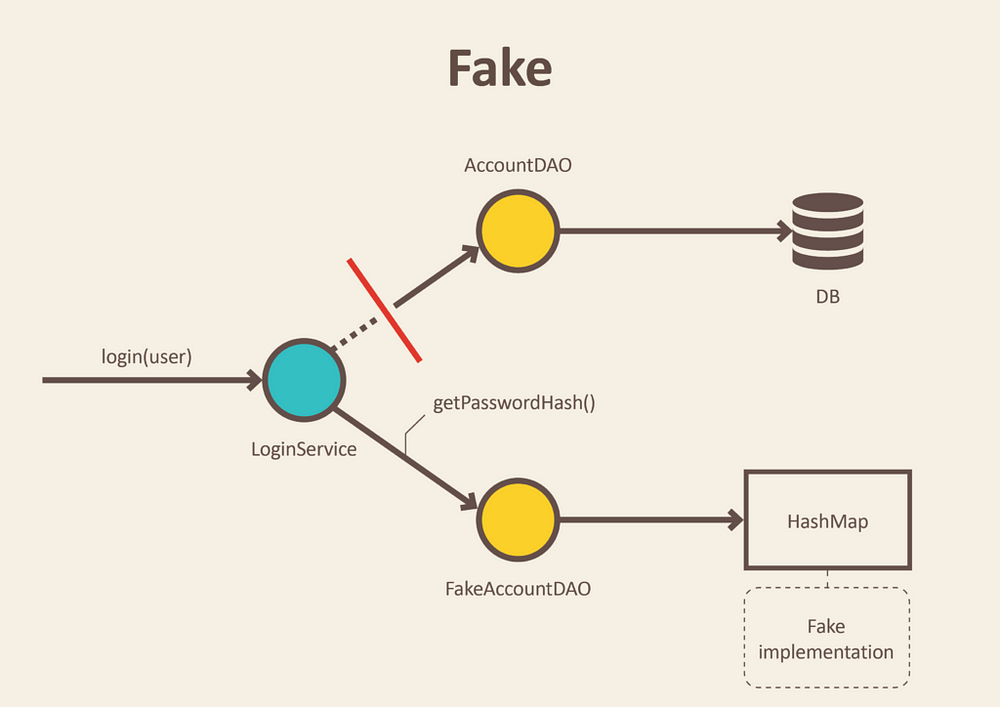
Fakes: They are objects that have working implementations, but not the same as the production ones. Usually, they take some shortcut and have a simplified version of the production code.  

e.g.
The above picture shows a Fake AccountDAO that is an in-memory implementation of Data Access Object and will not engage database but just use a simple collection to store data. This allows testers to do integration test of services without starting up a whole database and performing time-consuming requests.

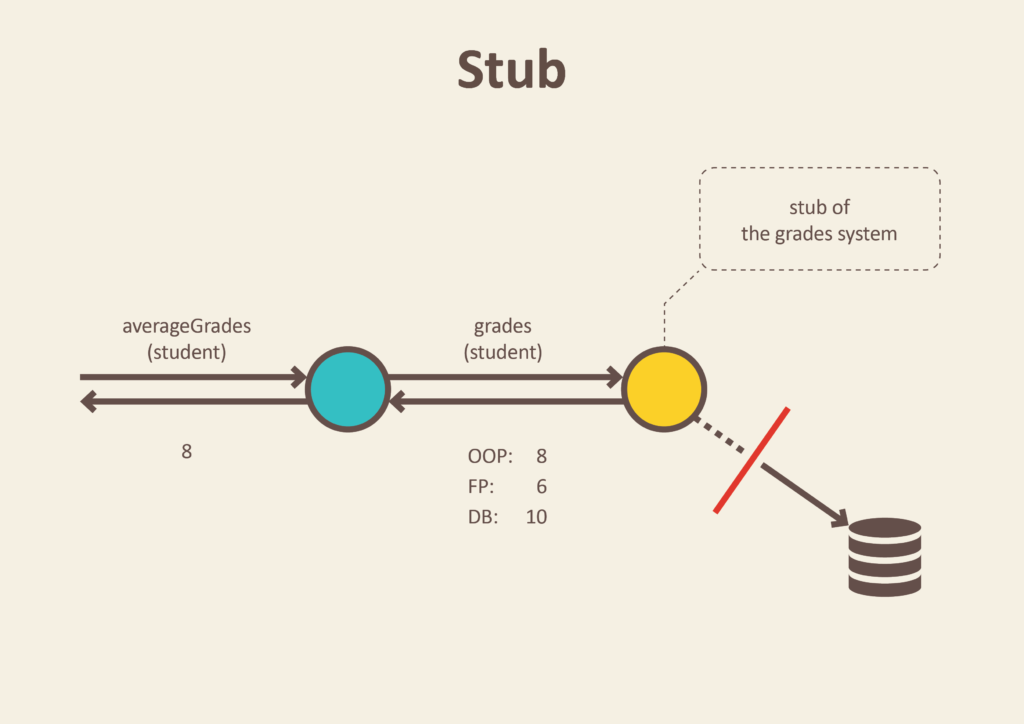
Stubs: They are objects that have predefined data and use it to answer the calls during tests when we can't or don't want to involve the reals objects that should answer the calls with real data.
e.g.
This example shows that a method calls an object to return some data from the real database. Instead of the real object, we introduce a stub within which just enough data has been defined to respond to the call during the test.

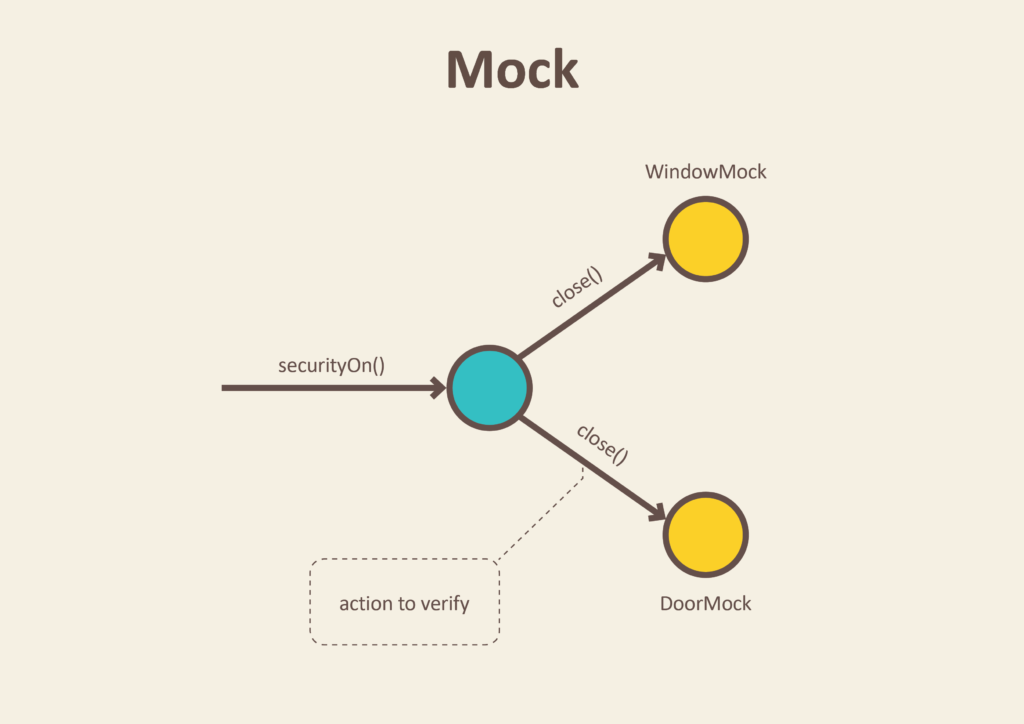
Mock: It's a method/object that simulates the behavior or a real method/object in controlled ways. we use mocks when we don't want to invoke the production code or there's no easy way to verify that the intended code was executed.
e.g.
In the above example, involving the real door and window is not easy or we don't want to do that each time when we test that if the security method is working. So we place door and window mocks in the test.
After execution of the securityOn method, window and door mocks recorded all interactions so that we can verify that window and door objects were instructed to close themselves. That's all we need to test from the SecurityCentral perspective.

Day10: Delete an automated check from your current check and share why you chose the one you deleted


Although the topic is about "Delete one automated check...", when I think about it, I just realise some checks could be deleted. 
In general, I'd delete some low-level risk of failure or fewer impact checks when doing automation tests, such as:
1, In the test of clicking on a button to open a drop-down menu and then choose an option from the menu, I'd delete the check of the drop-down menu.
2, In the test of navigating to some further page, I'd delete the check of the page navigated to if it's normally rarely failed.
3, similar to 2, in the test of acting with some pop-up windows, I'd delete the check that if the pop-up window is displayed. 

The reason why I'd delete them is that they are all low failure risk and impact checks, and even they fail the further test steps will fail, which means the failure can be caught. But if all these kind of checks are done every time, the whole test will consume quite a long time and then will result in a not very efficient testing. So I prefer to delete them.

Day9: Find, use and share your thoughts on an API testing tool


I've used two API testing tools: Postman and SoupUI. I prefer SoupUI between these two.

Although SoupUI Pro is a commercial version, SoupUI itself is an open source and its UI is just simple and user-friendly.

SoupUI is powerful at API testing. I only used it to do functional testing for both rest and soap APIs, but its functionality covers more than that. Its core features include:
  • Web services inspection
  • Web services invoking
  • Web services development
  • Web services simulation and mocking
  • Web services functional, compliance and security testing

As an API testing tool, it's easy to learn and use it and have fun, So I look forward to learning further in it:-)


Day7: How do you choose which tools to use in your testing?


Before answer this question(how, which?), we may ask: why do we need tools in our testing? Once we get the answer to the 'why' question, we might also get answers to the 'how' and 'which'.

Generally saying, only when the benefits of introducing a tool in testing are more than the risks of it, we'll consider to choose it. So, I think that always understanding the requirements of the project deeply and assessing the Return On Investment based on those requirements thoroughly could be helpful when we try to choose the most suitable tools in our testing. There're also some detailed key points as following we can consider:


  • Support your project environment? for Web, Desktop or MobileApps?
  • Ease of developing and maintaining test scripts? ease of test execution for your test team member?
  • Support to testing approaches which your team are using,e.g BDD, Key-word-driven, Data-driven, etc?
  • Produce test report?
  • Support to the languages your team are using, like Java, C#, etc?
  • Support to multi-browser or multi-OS where your project need to be tested? 
  • Time that your team will spend on being familiar with the tool?
  • Costs of using the tool? 
  • ....
Anyway, using tools for testing will be definitely helpful and useful if your choice is suitable. So, go for it with the right assessment and good luck:-)

Day6: Share what skills a team needs to succeed with automation in testing


I think that as a team if you want a great success with automation in testing, some skills should be essential, like:

1) General testing logical mind.
2) General knowledge about automation testing process and strategies.
3) Being able to build a practical Automation Framework with suitable automation tools.
4) Being able to design reporting facilitated, easy troubleshooting, easily maintainable and up-to-date automation tests.
5) On-time communication between the team.

Day5: Find, use and share your thoughts on a web UI testing tool


The web UI testing tool I've been using currently is Selenium WebDriver.

First of all, Selenium WebDriver is an open source tool. Anybody can download and use it at free cost.

Secondly, it can be used with many popular programming languages to write test scripts(It supports C#, Java, Python, PHP, Ruby, etc.), so it's easy to use. I use it with C# and Java.

Third, it automates web browsers and supports all popular browsers, such as Chrome, FireFox, Safari, etc. , so it's great to use it to do a web UI testing.

Fourth, it supports cross-browser testing.

Fifth, it supports various Operating Environment to implement tests, such as MS Windows, Linux, Macintosh etc.

Sixth, it supports parallel testing.

Seventh, it supports various test framework like NUnit, XUnit, JUnit, TestNG, etc.

Eighth, it has a good community to share knowledge. Testers can easily get answers to their questions about Selenium from online.

Ninth, it can integrate with some build automation tool like Maven.


Day4: What types of testing can automation support you with?


Automation can support many types of testing, generally saying, such as:

1) Unit test. Especially in a DevOps development model using CI/CD, every build would be followed by an automation unit test.

2) Regression testing. When a software or its environment is changed, a regression testing should be implemented to ensure that defects have not been introduced or uncovered in unchanged areas of the software, as a result of the changes made. Regression testing is competitive, and so could be boring and time and cost consuming. That would be great to automate those regression testing.

3) Sanity/Smoke testing. During these testings normally only a small set of but critical and basic test cases would be executed, and then further complete functional testing could be done based on the results of these testing. It means normally the same test suite will be executed and the result is expected to obtain soon. So automation can make these testing be done effectively and efficiently.

4) Performance testing. It's hard to do manual testing in some performance testing, e.g. a great number of users access an application in a few seconds. In this case, a tester can write automation code to drive a performance testing tool to do this test.

5) API testing. When testers test the public interfaces to some classes, modules or libraries, those we call as API testings. In this area, automation can also support testing.

Day2: Begin reading an automation related book and share something you've learnt by day 30

I'm reading Advanced Level Syllabus – Test Automation Engineer from ISTQB.
I've learnt something following:

Testware is necessary for the testing activities that include:
 Implementing automated test cases
 Monitoring and controlling the execution of automated tests
 Interpreting, reporting and logging the automated test results

Test automation has different approaches for interacting with a SUT:
 Testing through the public interfaces to classes, modules or libraries of the SUT (API testing)
 Testing through the user interface of the SUT (e.g., GUI testing or CLI testing)
 Testing through a service or protocol

Objectives of test automation include:
 Improving test efficiency
 Providing wider function coverage
 Reducing the total test cost
 Performing tests that manual testers cannot
 Shortening the test execution period
 Increasing the test frequency/reducing the time required for test cycles

Advantages of test automation include:
 More tests can be run per build
 The possibility to create tests that cannot be done manually (real-time, remote, parallel tests)
 Tests can be more complex
 Tests run faster
 Tests are less subject to operator error
 More effective and efficient use of testing resources
 Quicker feedback regarding software quality
 Improved system reliability (e.g., repeatability, consistency)
 Improved consistency of tests

Disadvantages of test automation include:
 Additional costs are involved
 Initial investment to setup TAS
 Requires additional technologies
 The team needs to have development and automation skills
 On-going TAS maintenance requirement
 Can distract from testing objectives, e.g., focusing on automating tests cases at the expense of executing tests
 Tests can become more complex
 Additional errors may be introduced by automation

Limitations of test automation include:
 Not all manual tests can be automated
 The automation can only check machine-interpretable results
 The automation can only check actual results that can be verified by an automated test oracle
 Not a replacement for exploratory testing